|  |
Manual: Features-Availability |
Availability
- What is the Availability mechanism?
- Availability permits the Chapter to pose 1 or more questions and/or choices for individual Users (Referees) to respond to. Typically, this is used to establish the "interests" a given Referee has.
- Why use the Concept?
- You can determine which subset of the Site's Users have an interest in a particular area. This might be Assignments in a specific geographic area, for a specific Type of Match, for individual Client organizations, or even special Chapter programs (Mentoring, etc.).
- How is the concept implemented?
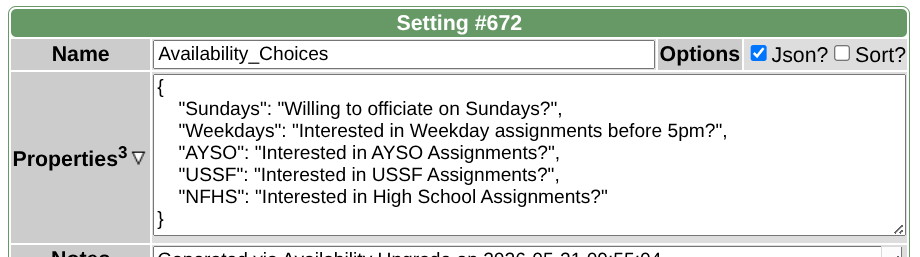
- If Feature=Availability has been activated for your site, define a Setting=Availability_Choices in the general formation of {key}:{description} where the {key} provides a short-hand way to reference the subset of Users. As examples, it might be Sundays (for day of week interest), AYSO (for interest in a specific Authority), or even a City name (if geography is significant).
- From the Referee's Perspective
- The Referee can click to Referee: Availability at any time and check ON or OFF the then-current various Availability choices to indicate an Interest (or lack thereof).
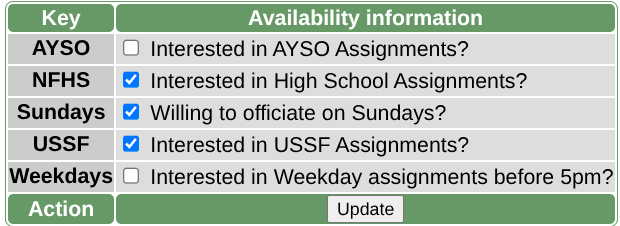
After clicking Update, the Keys checked ON will be stored in the Users table's Availability field permitting Chapter personnel to test and utilize the choices.
- From the Chapter's Perspective
- The Chapter can then use the subset of Users to customize their involvement with the Chapter. This can take the form of 1 or more of the following:
- Broadcast a message to the Referees that have expressed an interest (checked on the Availability choice)
- Use the Availability responses to control which Users appear in the Assignment page's pulldown (Assignment criteria Pulldown)
- Extract or download those Users with specific Availability characteristics via Manage-Users
|
|